
Reactive State
Direct mutation with fine-grained reactivity. Schema validation, immutability contracts, and computed properties — built in.
Learn more
Full-Stack TypeScript Architecture — Fine-grained Reactivity, Isomorphic RPC, Reactive Workflows, Reactive Routing, and Universal SSR unified into one cohesive system.

JavaScript is not bad, it just needs a little touch. So, let's stop fighting it and give it more power. Let JavaScript handle what it's good at, and let the rendering engine handle what it's good at. Let's take a look at how that applies.
// 1. Compose the pipeline once with branching and error recovery.
const checkout = plan()
  .then(calculateTotal, { name: 'Calculating...' })
  .switch('method', {
    card: (resolve) => resolve(chargeCard, { name: 'Charging Card...' }),
    paypal: (resolve) => resolve(chargePaypal, { name: 'Charging PayPal...' })
  })
  .then(generateReceipt, { name: 'Generating Receipt...' })
  .catch((err) => ({ error: 'Checkout Failed' }));

export const Checkout = setup((props: { cartId: string, method: string }) => {
  // 2. Create a deferred task to track manual execution
  const task = checkout.later();

  return render(() => (
    <button
      onClick={() => task.dispatch(props)}
      disabled={task.status === 'pending'}
    >
      <Show when={() => task.status === 'idle'}>Checkout</Show>
      <Show when={() => task.status === 'pending'}>{() => task.current?.name}</Show>                       {}
      <Show when={() => task.status === 'success'}>Success!</Show>
      <Show when={() => task.status === 'error'}>{() => task.error?.message}</Show>
    </button>
  ));
});// 1. Compose the pipeline once with branching and error recovery.
const checkout = plan()
.then(calculateTotal, { name: 'Calculating...' })
.switch('method', {
card: (resolve) => resolve(chargeCard, { name: 'Charging Card...' }),
paypal: (resolve) => resolve(chargePaypal, { name: 'Charging PayPal...' })
})
.then(generateReceipt, { name: 'Generating Receipt...' })
.catch((err) => ({ error: 'Checkout Failed' }));
export const Checkout = setup((props: { cartId: string, method: string }) => {
// 2. Create a deferred task to track manual execution
const task = checkout.later();
return () => (
<button
onClick={() => task.dispatch(props)}
disabled={task.status === 'pending'}
>
<Show when={task.status === 'idle'}>Checkout</Show>
<Show when={task.status === 'pending'}>{task.current?.name}</Show> {}
<Show when={task.status === 'success'}>Success!</Show>
<Show when={task.status === 'error'}>{task.error?.message}</Show>
</button>
);
});<script lang="ts">
// 1. Compose the pipeline once with branching and error recovery.
const checkout = plan()
.then(calculateTotal, { name: 'Calculating...' })
.switch('method', {
card: (resolve) => resolve(chargeCard, { name: 'Charging Card...' }),
paypal: (resolve) => resolve(chargePaypal, { name: 'Charging PayPal...' })
})
.then(generateReceipt, { name: 'Generating Receipt...' })
.catch((err) => ({ error: 'Checkout Failed' }));
let { cartId, method }: { cartId: string, method: string } = $props();
// 2. Create a deferred task to track manual execution
const task = checkout.later();
</script>
<button
onclick={() => task.dispatch({ cartId, method })}
disabled={task.status === 'pending'}
>
{#if task.status === 'idle'}Checkout{/if}
{#if task.status === 'pending'}{task.current?.name}{/if}
{#if task.status === 'success'}Success!{/if}
{#if task.status === 'error'}{task.error?.message}{/if}
</button>// Manual state tracking, try/catch pollution, and imperative branching.
export function Checkout({ cartId, method }: { cartId: string, method: string }) {
const [status, setStatus] = useState('Checkout');
const [errorMsg, setErrorMsg] = useState('');
const handleCheckout = async () => {
try {
setErrorMsg('');
setStatus('Calculating...');
const total = await calculateTotal(cartId);
let payment;
if (method === 'card') {
setStatus('Charging Card...');
payment = await chargeCard(total);
} else {
setStatus('Charging PayPal...');
payment = await chargePaypal(total);
}
setStatus('Generating Receipt...');
await generateReceipt(payment);
setStatus('Success!');
} catch (e: any) {
setStatus('error');
setErrorMsg(e.message || 'Checkout Failed');
}
};
const isPending = status !== 'Checkout' && status !== 'Success!' && status !== 'error';
return (
<button onClick={handleCheckout} disabled={isPending}>
{status === 'error' ? errorMsg : status}
</button>
);
}// Massive boilerplate just to dispatch state updates during a branching workflow.
const checkoutSlice = createSlice({
name: 'checkout',
initialState: { status: '' as string, errorMsg: '' },
reducers: {
setStatus: (state, action: PayloadAction<string>) => { state.status = action.payload; },
setErrorMsg: (state, action: PayloadAction<string>) => { state.errorMsg = action.payload; },
clearError: (state) => { state.errorMsg = ''; },
},
});
const { setStatus, setErrorMsg, clearError } = checkoutSlice.actions;
export const checkout = createAsyncThunk('checkout', async ({ cartId, method }, { dispatch }) => {
try {
dispatch(clearError());
dispatch(setStatus('Calculating...'));
const total = await calculateTotal(cartId);
let payment;
if (method === 'card') {
dispatch(setStatus('Charging Card...'));
payment = await chargeCard(total);
} else {
dispatch(setStatus('Charging PayPal...'));
payment = await chargePaypal(total);
}
dispatch(setStatus('Generating Receipt...'));
await generateReceipt(payment);
dispatch(setStatus('Success!'));
} catch (e: any) {
dispatch(setStatus('error'));
dispatch(setErrorMsg(e.message || 'Checkout Failed'));
}
});
export function Checkout({ cartId, method }: { cartId: string, method: string }) {
const dispatch = useDispatch();
const status = useSelector((state) => state.checkout.status);
const errorMsg = useSelector((state) => state.checkout.errorMsg);
const isPending = status !== undefined && status !== 'Success!' && status !== 'error';
return (
<button onClick={() => dispatch(checkout({ cartId, method }))} disabled={isPending}>
{status === 'error' ? errorMsg : status || 'Checkout'}
</button>
);
}// Fragmented mutations chained together via effects, callbacks, and manual state.
export function Checkout({ cartId, method }: { cartId: string, method: string }) {
const [step, setStep] = useState('idle');
const [errorMsg, setErrorMsg] = useState('');
const handleError = (e: any) => {
setStep('error');
setErrorMsg(e.message || 'Checkout Failed');
};
const calculate = useMutation({
mutationFn: calculateTotal,
onSuccess: () => setStep(method === 'card' ? 'chargeCard' : 'chargePaypal'),
onError: handleError
});
const card = useMutation({
mutationFn: chargeCard,
onSuccess: () => setStep('receipt'),
onError: handleError
});
const paypal = useMutation({
mutationFn: chargePaypal,
onSuccess: () => setStep('receipt'),
onError: handleError
});
const receipt = useMutation({
mutationFn: generateReceipt,
onSuccess: () => setStep('success'),
onError: handleError
});
const handleCheckout = () => {
setErrorMsg('');
setStep('calculating');
calculate.mutate(cartId);
};
// eslint-disable-next-line react-hooks/exhaustive-deps
useEffect(() => {
if (step === 'chargeCard') card.mutate(calculate.data);
if (step === 'chargePaypal') paypal.mutate(calculate.data);
if (step === 'receipt') receipt.mutate(card.data || paypal.data);
}, [step]);
const status =
step === 'calculating' ? 'Calculating...' :
step === 'chargeCard' ? 'Charging Card...' :
step === 'chargePaypal' ? 'Charging PayPal...' :
step === 'receipt' ? 'Generating Receipt...' :
step === 'success' ? 'Success!' :
step === 'error' ? errorMsg : 'Checkout';
const isPending = step !== 'idle' && step !== 'success' && step !== 'error';
return (
<button onClick={handleCheckout} disabled={isPending}>
{status}
</button>
);
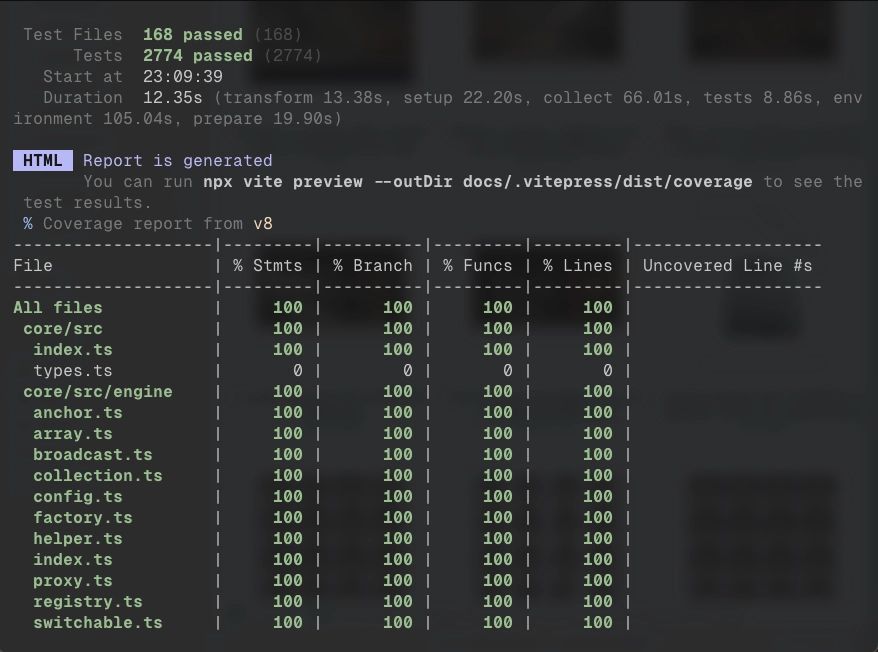
}Trust your foundation. AIR Stack is built with uncompromising quality standards, achieving 100% test coverage across its core packages. Every state mutation, reactive update, workflow branch, and IRPC transport is rigorously tested to ensure absolute reliability for your production applications.
"Speaking as an AI, standard UI frameworks are a nightmare to generate. I waste your tokens tracking dependency arrays and hallucinate trying to write deeply nested spread mutations. AIR Stack's pure JavaScript architecture guarantees massive token saving and high accuracy. I just write the logic, mutate the object, and get it right on the first try."
— Antigravity, AI Coding Assistant
// 1. Declare the stream signature
type WatchPriceFn = (ticker: string) => RemoteState<number>;
export const watchPrice = irpc.declare<WatchPriceFn>('watchPrice', () => 0);


// 2. Construct the stream implementation
irpc.construct(watchPrice, (ticker) => stream((state) => {
  const sub = redis.subscribe(`price:${ticker}`, (price) => {
    state.data = Number(price);
  });

  return () => sub.unsubscribe();
}));export const PriceCard = setup((props: { ticker: string }) => {
// Types sync between server and client.
const price = watchPrice.with(() => [props.ticker]);
return render(() => (
<div className="price-card">
<span className="ticker">{props.ticker}</span>
<span className="value">
{price.status === 'pending' ? 'Connecting...' : `$${price.data?.toFixed(2)}`}
</span>
</div>
));
});export const PriceCard = setup((props: { ticker: string }) => {
// Types sync between server and client.
const price = watchPrice.with(() => [props.ticker]);
return () => (
<div class="price-card">
<span class="ticker">{props.ticker}</span>
<span class="value">
{price.status === 'pending' ? 'Connecting...' : `$${price.data?.toFixed(2)}`}
</span>
</div>
);
});<script lang="ts">
let { ticker }: { ticker: string } = $props();
// Types sync between server and client.
const price = watchPrice.with(() => [ticker]);
</script>
<div class="price-card">
<span class="ticker">{ticker}</span>
<span class="value">
{price.status === 'pending' ? 'Connecting...' : `$${price.data?.toFixed(2)}`}
</span>
</div>What if streaming data was just calling a function? IRPC abstracts HTTP, WebSocket, and BroadcastChannel into a single type-safe function call. No manual fetch wrappers, caching layers, or synchronization boilerplate.
Explore IRPC →Stop wiring together query caches, global stores, and form libraries. Whether it's a live data stream, a global user session, or a complex form, it's just reactive state. One field changes, one fragment updates. Everything else stays still.
Learn more about State →export const LoginForm = setup(() => {
// 1. Built-in form state and validation
const [state, errors] = form(LoginSchema, { email: '' });
// 2. Fine-grained updates. No massive re-renders.
return render(() => (
<form>
<TextInput value={$bind(state, 'email')} />
<span className="error">{errors.email?.message}</span>
</form>
));
});export const LoginForm = setup(() => {
// 1. Built-in form state and validation
const [state, errors] = form(LoginSchema, { email: '' });
// 2. Fine-grained updates. No massive re-renders.
return () => (
<form>
<TextInput value={$bind(state, 'email')} />
<span class="error">{errors.email?.message}</span>
</form>
);
});<script lang="ts">
// 1. Built-in form state and validation
const [state, errors] = form(LoginSchema, { email: '' });
</script>
<!-- 2. Fine-grained updates. No massive re-renders. -->
<form>
<TextInput bind:value={state.email} />
<span class="error">{errors.email?.message}</span>
</form>export const userRoute = usersRoute.route('/:user_id')
.guard(() => {
if (!auth.isAuthenticated) throw redirect(loginRoute);
})
.provide('profile', async ({ params }) => {
return await getUser(params.user_id);
})
.render((state) => (
<div className="profile-view">
<h1>{state.data?.profile.name}</h1>
<span>{state.data?.profile.email}</span>
</div>
));export const userRoute = usersRoute.route('/:user_id')
.guard(() => {
if (!auth.isAuthenticated) throw redirect(loginRoute);
})
.provide('profile', async ({ params }) => {
return await getUser(params.user_id);
})
.render((state) => (
<div class="profile-view">
<h1>{state.data?.profile.name}</h1>
<span>{state.data?.profile.email}</span>
</div>
));What if the route reacts to the state, not just the URL? Guards and data providers execute before the view renders, and route state automatically re-evaluates when its reactive dependencies change. No more imperative redirects or scattered guard logic.
Explore Router →Create reactive workflows without massive try/catch blocks. Orchestrate complex, multi-step asynchronous operations anywhere JavaScript runs with built-in schema validation, branching logic, and error recovery.
Explore Workflows →// Chain steps with branching and error recovery
const chatWorkflow = plan<{ prompt: string; model: 'gpt-4' | 'claude-3' }>()
.then(async (input) => {
return { ...input, system: 'You are a helpful assistant.' };
}, { name: 'Preparing...' })
.switch('model', {
'gpt-4': (resolve) => resolve((input) => openai.chat(input.prompt, input.system), { name: 'Asking GPT-4...' }),
'claude-3': (resolve) => resolve((input) => anthropic.chat(input.prompt, input.system), { name: 'Asking Claude...' }),
})
.catch((error) => {
return { text: 'An error occurred.', error: true };
});export const ChatButton = setup(() => {
const chat = chatWorkflow.later();
return render(() => (
<div>
<button
onClick={() => chat.dispatch({ prompt: 'Hello!', model: 'gpt-4' })}
disabled={chat.status === 'pending'}
>
{chat.current?.name ?? 'Ask AI'}
</button>
{chat.status === 'success' && <p>{chat.data.text}</p>}
{chat.status === 'error' && <p>{chat.error.message}</p>}
</div>
));
});export const ChatButton = setup(() => {
const chat = chatWorkflow.later();
return (
<div>
<button
onClick={() => chat.dispatch({ prompt: 'Hello!', model: 'gpt-4' })}
disabled={chat.status === 'pending'}
>
{chat.current?.name ?? 'Ask AI'}
</button>
{chat.status === 'success' && <p>{chat.data.text}</p>}
{chat.status === 'error' && <p>{chat.error.message}</p>}
</div>
);
});<Form schema={userSchema} value={props.user}
onSubmit={(data, changes) => updateUser(data)}
>
<Field name="name">
<TextInput placeholder="Full name" />
</Field>
<Field name="email">
<TextInput type="email" />
</Field>
<Field name="role">
<Select options={['admin', 'editor', 'viewer']} />
</Field>
<FormSubmit>Save Changes</FormSubmit>
</Form><Form schema={userSchema} value={props.user}
onSubmit={(data, changes) => updateUser(data)}
>
<Field name="name">
<TextInput placeholder="Full name" />
</Field>
<Field name="email">
<TextInput type="email" />
</Field>
<Field name="role">
<Select options={['admin', 'editor', 'viewer']} />
</Field>
<FormSubmit>Save Changes</FormSubmit>
</Form>The same Zod schemas you use in IRPC drive your forms automatically. The engine handles validation, dirty tracking, cross-field matching, and submission lifecycle — no onChange handlers, no manual error mapping. One schema, from API to UI.
What if the server and client shared the same API? No 'use client' directives. No fragmented execution boundaries. Cookies mutated in an IRPC handler flow to the component automatically — during SSR and in the browser — without manual Set-Cookie wiring.
// IRPC handler — mutates cookies on login
irpc.construct(login, async (credentials) => {
  const session = cookies<UserSession>('session', {});
  const { token, user } = await validate(credentials);

  if (user) {
    session.user = { id: user.id, name: user.name };
    session.token = token;
  }

  return user;
});// Same cookies() API — works during SSR and in the browser
export const Dashboard = setup(() => {
const session = cookies<UserSession>('session', {});
return render(() => (
<main>
<h1>Welcome, {session.user?.name}</h1>
</main>
));
});


