
Introducing AIR Stack v1.0 — Reactive Full-Stack Framework, from DB to UI
v1.0.0 — GitHub | MIT Licensed
AIR Stack is a full-stack TypeScript architecture — Anchor (state), IRPC (network), and Router (navigation), backed by a single reactive graph. No separate state manager, API client, caching layer, or form library.
Replacing Meta Framework?
AIR Stack is not here to replace the existing frameworks and libraries such as Next.js, Remix, Express, Fastify, Hono, Elysia, tRPC, TanStack Query, SWR, RTK Query, Apollo Client, React Router, TanStack Router, Redux, Zustand, Jotai, Recoil, Valtio, MobX, XState, React Hook Form, or Formik. AIR Stack brings their best into one single cohesive system.
Reactive, from DB to UI
In a typical web app, even a simple CRUD page requires wiring separate libraries for REST endpoints, data fetching, form handling, validation, and mutations. Here's how a project editor looks in AIR Stack.
// rpc/projects/index.ts
import { irpc } from '@lib/module.js';
import { z } from 'zod/v4';

const projectSchema = z.object({
  id: z.string(),
  name: z.string(),
  description: z.string(),
  status: z.enum(['active', 'archived']),
});
export type Project = z.infer<typeof projectSchema>;

const input = projectSchema.omit({ id: true });
const skeleton = () => ({ id: '', name: '', description: '', status: '' });

export const projects = irpc.crud<Project>('projects', skeleton, {
  schema: {
    create: { input: [input], output: projectSchema },
    update: { input: [z.string(), input], output: projectSchema },
  }
});
A single stub declaration generates four typed stubs — projects.get, projects.create, projects.update, projects.delete — each with caching, batching, request coalescing, and retry built in. Call them from browser, worker, even the same server thread.
// ProjectForm.tsx
export const ProjectForm = setup<{ id: string }>((props) => {
  const project = projects.get.with(() => [props.id]);
  const updater = projects.update.later();

  const handleSubmit = (e: React.FormEvent) => {
    e.preventDefault();
    updater.dispatch(project.data.id, project.data);
  };

  return render(() => (
    <form onSubmit={handleSubmit}>
      <InputField value={$bind(project.data, 'name')} />
      <TextArea value={$bind(project.data, 'description')} />
      <Select value={$bind(project.data, 'status')} options={['active', 'archived']} />

      <button disabled={updater.status === 'pending'}>Save</button>
    </form>
  ));
});// ProjectForm.tsx
export const ProjectForm = setup<{ id: string }>((props) => {
const project = projects.get.with(() => [props.id]);
const updater = projects.update.later();
const handleSubmit = (e: SubmitEvent) => {
e.preventDefault();
updater.dispatch(project.data.id, project.data);
};
return (
<form onSubmit={handleSubmit}>
<InputField value={$bind(project.data, 'name')} />
<TextArea value={$bind(project.data, 'description')} />
<Select value={$bind(project.data, 'status')} options={['active', 'archived']} />
<button disabled={updater.status === 'pending'}>Save</button>
</form>
);
});No fetch hook, no form state, no mutation handler — the CRUD stubs serve as API client, cache, and bindable state in one. $bind wires each input directly to the data. Only the touched input re-renders. The React and Solid versions differ by a single line.
What's Inside
- Remote Functions (IRPC) — reactive remote function calls across client and server, with streaming and swappable transports (HTTP, WebSocket, Broadcast)
- Workflow Orchestration — reactive workflow orchestration with step tracking, branching, validation, and error recovery
- Routing — fine-grained routing with reactive guards, data loading, and navigation in a single typed chain
- State Management — reactive state with direct mutation, true-immutability, derived values, and headless composition
- User Interface — reactive components with two-way binding and fine-grained updates that follows HTML standard
- Universal SSR — reactive server-side rendering across Bun, Node.js, Cloudflare Workers, and Deno with request isolation and ISR
Remote Functions (IRPC)
In a typical full-stack app, client-server communication means wiring REST routes, writing fetch calls, serializing payloads, and managing different protocols for different features. Each concern is a separate library.
IRPC separates the function signature from its implementation and its transport. Declare a typed stub, implement it elsewhere, call it like a local function.
Standard Function
Standard function is a one-shot function that take input, process, and return output.
Declare a function
// rpc/hello/index.ts — declaration (shared, publishable)
export const hello = irpc.declare<(name: string) => Promise<string>>('hello', () => '');
Implement the function logic
// rpc/hello/constructor.ts — implementation (server-only)
irpc.construct(hello, (name) => `Hello, ${name}!`);
Call the function
const message = await hello('John');export const Greeting = setup<{ name: string }>((props) => {
const message = hello.with(() => [props.name]);
return render(() => <p>{message.data}</p>);
});export const Greeting = setup<{ name: string }>((props) => {
const message = hello.with(() => [props.name]);
return <p>{message.data}</p>;
});Streaming Function
Streaming function is a function that take input, process, return initial data, and progressively update data as it being processed. It is useful for long-running operations like AI generation, multi-step operations, etc.
// rpc/chat/index.ts — declare a stream
type ChatFn = (prompt: string) => RemoteState<string>;
export const chat = irpc.declare<ChatFn>('chat', () => '', { stream: true });// rpc/chat/constructor.ts — yield chunks
irpc.construct(chat, (prompt) => stream(async (state, resolve) => {
for await (const chunk of ai.generate({ prompt, stream: true })) {
state.data = (state.data || '') + chunk.text;
}
resolve();
}));// ChatForm.tsx
export const ChatForm = setup(() => {
const state = mutable({ prompt: '' });
const message = chat.later();
const submit = (e: React.FormEvent) => {
e.preventDefault();
message.dispatch(state.prompt);
};
const Message = snippet(() => <p>{message.data}</p>);
return render(() => (
<div className="chat-form">
<Message />
<form onSubmit={submit}>
<Input value={$bind(state, 'prompt')} placeholder="Ask something..." />
<button type="submit" disabled={message.status === 'pending'}>Send</button>
</form>
</div>
));
});// ChatForm.tsx
export const ChatForm = setup(() => {
const state = mutable({ prompt: '' });
const message = chat.later();
const submit = (e: SubmitEvent) => {
e.preventDefault();
message.dispatch(state.prompt);
};
return (
<div class="chat-form">
<p>{message.data}</p>
<form onSubmit={submit}>
<Input value={$bind(state, 'prompt')} placeholder="Ask something..." />
<button type="submit" disabled={message.status === 'pending'}>Send</button>
</form>
</div>
);
});const message = chat('Write a poem about space');
message.subscribe((state) => {
console.log(state.data);
});Features
Below is what IRPC handles out of the box, from declaration to execution.
Transport & Distribution
- Transport agnosticism — HTTP, WebSocket, BroadcastChannel; function calls and component bindings stay identical across all
- BroadcastChannel — call functions across tabs, Web Workers, and iframes without a server
- Dynamic transport switching — swap execution target at runtime (cloud ↔ Web Worker) without changing function calls
- Microservice routing — each package routes to its own server, no API gateway
- Custom transports — extend
IRPCTransportfor any wire protocol - Credential management —
transport.sign()on client,credential()on server
Learn more about Transports and Distribution.
Execution & Lifecycle
- Automatic batching — concurrent calls merged into a single request
- Reactive bindings —
.with()re-runs on dependency change,.when()defers until truthy,.later()for manual dispatch,.once()fires once - Caching + invalidation —
maxAgecaches messages,irpc.invalidate()clears stale entries - Request coalescing — identical concurrent calls share a single in-flight request
- Retry with backoff — configurable linear or exponential retry for transport failures
- File uploads — pass
IRPCFileas arguments, transport handles extraction and reconstruction - Runtime validation — Zod schemas for input/output enforcement
- Auto-cleanup — readers closed automatically on component unmount
- Progressive hydration — stream parallel queries, UI renders each field as it arrives
- Function composition — handlers call other stubs directly; same-thread calls bypass network
Learn more about Functions and Handlers.
Server Architecture
- Versioned packages — namespaced function routing, no collisions across services
- CRUD module —
irpc.crud()batch-declares get/create/update/delete with adapter/driver wiring - Hooks —
irpc.hook()applies cross-cutting concerns (auth, logging) to stubs - Request context — isolated per-request store via
getContext()/setContext() - Webhook ingestion — route incoming REST webhooks through IRPC handlers
- Live monitoring —
IRPC_STOREtracks in-flight calls, packages, and routers - Publishable stubs — declaration files safe to ship as npm packages; implementation stays private
Learn more about CRUD, Handlers, and Webhooks.
Workflow Orchestration (Workflow)
In most async orchestration, each concern requires its own manual wiring — try/catch for recovery, if/else for routing, Zod calls for validation, logging around every request — and none of them compose. Business logic disappears under ceremony.
Anchor Workflows turn multi-step async logic into a Promise-like chain with built-in routing, validation, recovery, and observability:
const chatWorkflow = plan<{ prompt: string; model: 'gpt-4' | 'claude-3' }>()
  .then(async (input) => {
    const system = 'You are a helpful assistant.';
    return { ...input, system };
  })
  .switch('model', {
    'gpt-4': (resolve) => resolve((input) => openai.chat(input.prompt, input.system)),
    'claude-3': (resolve) => resolve((input) => anthropic.chat(input.prompt, input.system)),
  })
  .catch((error) => {
    console.error('AI request failed:', error);
    return { text: 'An error occurred.', error: true };
  });
Execute it directly, through IRPC, or from a component:
const result = await chatWorkflow({ prompt: 'Hello!', model: 'gpt-4' });
console.log(result.text);irpc.construct(askAi, (prompt, model) => {
return chatWorkflow({ prompt, model });
});export const ChatButton = setup(() => {
const chat = chatWorkflow.later();
return render(() => (
<div>
<button onClick={() => chat.dispatch({ prompt: 'Hello!', model: 'gpt-4' })} disabled={chat.status === 'pending'}>
{chat.current?.name ?? 'Ask AI'}
</button>
{chat.status === 'success' && <p>{chat.data.text}</p>}
{chat.status === 'error' && <p>{chat.error.message}</p>}
</div>
));
});export const ChatButton = setup(() => {
const chat = chatWorkflow.later();
return (
<div>
<button onClick={() => chat.dispatch({ prompt: 'Hello!', model: 'gpt-4' })} disabled={chat.status === 'pending'}>
{chat.current?.name ?? 'Ask AI'}
</button>
{chat.status === 'success' && <p>{chat.data.text}</p>}
{chat.status === 'error' && <p>{chat.error.message}</p>}
</div>
);
});You can build server-only pipelines like payment processing and database migrations, browser-only flows like multi-step wizards and onboarding, or shared logic like validation chains and data transformations — the same API, no platform-specific dependencies.
Features
Below is what Workflow handles out of the box, from pipeline composition to reactive execution.
Pipeline & Recovery
- plan() — Promise-like chaining with
.then(),.catch(),.finally() - Pipeline composition —
plan(existingPlan)clones and extends a base sequence - Error recovery —
.catch()traps errors and resumes normal execution - Guaranteed cleanup —
.finally()runs regardless of success or failure
Learn more about Plan & Recover.
Branching & Validation
- .switch() — key-based or matcher-function routing with isolated branches
- Schema validation — Zod/Valibot at pipeline input, output, and step boundaries
- Step boundary validation — enforce data shape between individual steps
Learn more about Branching Logic and Schema Validation.
Reactive Execution & Observability
- Reactive bindings —
.once(),.with(),.when(),.later()mirror IRPC patterns - Step-by-step tracking —
reader.current.nameshows which step is running - Manual stepping —
.step(),.run(),.skip(),.reset()for wizard-style flows - Persistence —
snapshot()/hydrate()for resuming after crashes - WorkflowStore — global observability, telemetry subscription, reactive dashboards
Learn more about Reactive Execution and Observability.
Routing (Router)
In most frameworks, routes, data fetching, and access control live in separate files with separate APIs. Route paths are strings — rename a segment and links break silently. Auth checks run after render, causing flashes of unauthorized content. Data fetching starts after mount, causing loading waterfalls.
Anchor Router binds the URL path, guards, and data loaders into a single typed chain. The view attaches separately via page(route).render(), keeping route logic and UI decoupled.
Define a route
// routes/users/[user_id]/route.ts
export const profileRoute = usersRoute
  .route('/:user_id')
  .guard(() => {
    if (!isAuthenticated()) throw redirect(loginRoute);
  })
  .provide({
    profile: ({ params }) => getUserProfile(params.user_id),
    posts: ({ params }) => getUserPosts(params.user_id),
  });
Render the page
// routes/users/[user_id]/page.tsx
export const ProfilePage = page(profileRoute).render(({ state }) => (
  <>
    <Show when={() => state.data.profile}>
      {({ name, email }) => (
        <div>
          <h1>{name}</h1>
          <p>{email}</p>
        </div>
      )}
    </Show>

    <Show when={() => state.data.posts}>
      {(posts) => (
        <ul>
          <For each={posts}>
            {(post) => <li>{post.title}</li>}
          </For>
        </ul>
      )}
    </Show>
  </>
));// routes/users/[user_id]/page.tsx
export const ProfilePage = page(profileRoute).render(({ state }) => (
<>
<Show when={state.data.profile}>
{(profile) => (
<div>
<h1>{profile.name}</h1>
<p>{profile.email}</p>
</div>
)}
</Show>
<Show when={state.data.posts}>
{(posts) => (
<ul>
<For each={posts}>
{(post) => <li>{post.title}</li>}
</For>
</ul>
)}
</Show>
</>
));Navigate with type safety
<Link to={ProfilePage} params={{ user_id: '42' }}>View Profile</Link>Rename /:user_id to /:id — TypeScript catches every broken link at compile time.
Features
Below is what Anchor Router handles out of the box.
Route Structure
- Type-safe route tree — routes chain from parent to child, TypeScript infers params across the entire tree
- Decoupled rendering — route definitions are pure TypeScript objects, view attaches separately via
.render() - Index routes —
.route('/')defines the default view in a layout'schildrenslot - Modal routes —
modal()renders as overlay, keeps current page mounted - Independent routes —
router.append()creates top-level routes outside the main layout tree - Error boundaries — global
router.catch()and per-route.catch()for 404s and failures - Subdirectory hosting — change root route path, all links rebase automatically
Navigation & Rendering
- Fine-grained routing — only the component observing a changed state re-renders, not the entire tree
- Parameter mutations —
/users/1to/users/2doesn't unmount the view, just updates state in place - Layout persistence — parent shells stay mounted during child navigation
- Render modes —
deferredblocks until data resolves,immediaterenders the shell and streams data in - Route options —
keepAlive,preloadMode,maxAge,maxRetries,retryDelayper route or globally - Active state — hierarchical
aria-current="page"and active class on<Link> - Programmatic navigation —
navigate()accepts route objects, components, or strings - URL generation —
.url()builds URL strings without navigating - Global progress —
router.state.progress/router.state.stepsfor loading indicators
Guards & Access Control
- Pre-render guards — guards run before the component mounts, no flash of unauthorized content
- Parallel execution — multiple
.guard()calls run viaPromise.all() - Hierarchical protection — parent guard blocks all descendant routes automatically
- Reactive guards — re-evaluate when global reactive state changes
- Type-safe redirects —
redirect()accepts route objects or components, not string paths
Data Loading
- Reactive providers — providers re-run when global reactive state they read changes, no manual dependency tracking
- Dependent providers — chained
.provide()runs sequentially, each receives upstream data viadata - Preloading — providers start fetching when user hovers a
<Link> - Scoped data —
state.datafor local route,context.datafor merged tree across all active parents - Per-provider tracking —
state.resolving.has('profile')checks if a specific provider is still loading
Learn more about Routes & Layouts, Data Loaders, Guards, and Navigation.
State Management (Anchor Core)
In most UI frameworks, mutation is silent — obj.count++ updates the value but nothing in your app knows it happened. To make state reactive, libraries force you into immutable copies (useState, Redux) or special setters (setState, store.update). Both add boilerplate and disconnect state from logic.
Anchor solves this by transparently upgrading your objects into reactive Proxies. You read and write properties normally — the proxy tracks dependencies and triggers updates automatically.
Inline state — state that belongs to the component:
// Counter.tsx
export const Counter = setup(() => {
  const state = mutable({ count: 0 });
  return render(() => (
    <button onClick={() => state.count++}>Count: {state.count}</button>
  ));
});// Counter.tsx
export const Counter = setup(() => {
const state = mutable({ count: 0 });
return (
<button onClick={() => state.count++}>Count: {state.count}</button>
);
});Headless state — logic defined once, used across components:
// states/counter.ts
export function createCounter() {
  return mutable({
    count: 0,
    increment() {
      this.count++;
    },
  });
}// Counter.tsx
export const Counter = setup(() => {
const counter = createCounter();
return render(() => (
<button onClick={() => counter.increment()}>Count: {counter.count}</button>
));
});// Counter.tsx
export const Counter = setup(() => {
const counter = createCounter();
return (
<button onClick={() => counter.increment()}>Count: {counter.count}</button>
);
});Features
Below is what Anchor's reactivity system handles out of the box.
Reactivity & Access
- Direct mutation —
state.count++triggers updates, no setters or copies - Deep reactivity — nested objects auto-wrapped, configurable depth (
true,false,'flat') - Computed getters — standard JS
geton mutable objects, auto-tracks dependencies - Encapsulation — methods on the state object modify via
this - Read-only state —
immutable()blocks writes, safe for sharing across modules - Write contracts —
writable(state, ['theme'])grants controlled writes to read-only state - Class support —
mutable(new MyClass())works with class instances out of the box
Learn more about Mutable and Immutable.
Derived & Effects
- derived() — combines multiple independent state sources, no dependency arrays
- ordered() — reactive sorted view with O(log N) binary insertion
- effect() — auto-tracks dependencies, cleanup on re-run/unmount
- Dynamic tracking — dependencies tracked per execution path, not static arrays
- untrack() — read reactive values without subscribing
- snapshot() / stringify() — safe serialization without tracking
- subscribe() — global listener for any change in a state tree
- effect.client — browser-only effects, skipped during SSR
Learn more about Derived and Side Effects.
Forms & Async
- form() — Zod schema validation with reactive error map per field
- $bind() / $use() — two-way binding and error linking for components
- query() — reactive async container with status, cancellation, and AbortSignal
- Structural initial data — safe to access
.dataimmediately, no optional chaining
Learn more about Forms and Async.
Architecture
- Headless state — define logic in plain TypeScript, consume from any UI layer
- Global / Local / Headless — three scoping patterns with SSR-safe guidance
- Context API —
setContext()/getContext()for per-request state in SSR
Learn more about Advanced Patterns.
User Interface (UI)
In one-way data flow, parents end up micromanaging children — computing isActive for each button, wiring onClick for each one, tracking state that belongs to the child. The boss does the employees' work. Add more buttons, the boss drowns.
The AIR Stack prefers autonomous components — following HTML's mental model where <input> and <details> manage themselves. Each component carries its own state (including props), determines its own behavior, and syncs with the parent through state contracts ($bind) instead of event callbacks.
// NavButton.tsx — autonomous component
const NavButton = setup<{ name: string; value?: Bindable<string> }>((props) => {
  return render(() => (
    <button
      className={props.value === props.name ? 'active' : ''}
      onClick={() => (props.value = props.name)}
    >
      {props.name}
    </button>
  ));
});// NavButton.tsx — autonomous component
const NavButton = setup<{ name: string; value?: Bindable<string> }>((props) => {
return (
<button
classList={{ active: props.value === props.name }}
onClick={() => (props.value = props.name)}
>
{props.name}
</button>
);
});The parent binds state. Each button handles itself:
// Nav.tsx
const Nav = setup(() => {
  const state = mutable({ active: 'Home' });
  return render(() => (
    <nav>
      <NavButton name="Home" value={$bind(state, 'active')} />
      <NavButton name="About" value={$bind(state, 'active')} />
      <NavButton name="Contact" value={$bind(state, 'active')} />
    </nav>
  ));
});// Nav.tsx
const Nav = setup(() => {
const state = mutable({ active: 'Home' });
return (
<nav>
<NavButton name="Home" value={$bind(state, 'active')} />
<NavButton name="About" value={$bind(state, 'active')} />
<NavButton name="Contact" value={$bind(state, 'active')} />
</nav>
);
});When NavButton writes to props.value, the binding propagates to state.active in the parent. Any component reading state.active sees the update automatically.
Features
Component Architecture
- setup() — component function runs once, stable closure survives re-renders
- render() — reactive view boundary inside a component (React)
- template() — standalone reactive view with explicit props (React)
- snippet() — inline reactive boundary inheriting parent closure (React)
- Three-tier UI — Static (markup), View (one-way reactive), Component (autonomous)
Learn more about Components, Reactive UI, and Static UI.
Data Flow
- Bindable — two-way prop binding via
$bind(), child writes propagate to parent - $use() — pass-by-reference for reactive one-way props (React)
- State contracts — bindings control state, events handle side effects
Learn more about Components and Form Components.
Lifecycle & Integration
- onMount() / onCleanup() — browser-only resource management
- IRPC calls —
.once(),.with(),.when(),.later()directly in components - Optimistic UI — update state before server confirms, rollback on failure
Learn more about Optimistic UI and Styling.
Universal SSR
Most frameworks split code into server and client boundaries — 'use client', 'use server', separate data-fetching layers, hydration mismatches. The component you write for the browser is not the component that runs on the server.
In AIR Stack, the same component renders on every runtime. The SSR layer handles request isolation, cookie propagation, abort signals, and redirect capture. Here is how AIR Stack handle cookie propagation from an IRPC handler to Component:
// IRPC handler — mutates cookies on login
irpc.construct(login, async (credentials) => {
  const session = cookies<UserSession>('session', {});
  const { token, user } = await validate(credentials);

  if (user) {
    session.user = { id: user.id, name: user.name };
    session.token = token;
  }

  return user;
});
On the client, the same cookies() call reads the session during SSR and hydration — no separate data-fetching layer:
export const Dashboard = setup(() => {
  const session = cookies<UserSession>('session', {});

  return render(() => (
    <main>
      <h1>Welcome, {session.user?.name}</h1>
    </main>
  ));
});export const Dashboard = setup(() => {
const session = cookies<UserSession>('session', {});
return () => (
<main>
<h1>Welcome, {session.user?.name}</h1>
</main>
);
});Both paths share the same cookies() API — mutations in IRPC handlers are captured in the IRPC response, mutations during SSR rendering are captured in the SSR output. No manual Set-Cookie wiring in either case.
Dev Server
// vite.config.ts
import { airSSR } from '@anchorlib/vite-ssr';

export default defineConfig({
  plugins: [
    react(),
    airSSR({
      router: './src/lib/router.ts',
      layout: './src/pages/layout.tsx',
      renderer: '@anchorlib/react/ssr',
      irpc: {
        module: { path: './src/lib/module.ts', name: 'irpc' },
        transport: { path: './src/lib/module.ts', name: 'transport' },
        wsTransport: { path: './src/lib/module.ts', name: 'wsTransport' },
        handlers: ['./src/pages/constructor.ts'],
      },
    }),
  ],
});
One Vite plugin handles SSR rendering, IRPC routing, and WebSocket streaming on the same dev server.
Features
Below is what the SSR layer handles out of the box, from rendering to deployment.
Rendering & Isolation
- Reactive SSR output — returns
html,head,status,cookies[], andredirectas a structured result - Request isolation — each render gets its own reactive scope, no state leaks between concurrent requests
- Cookie propagation — cookies mutated during rendering (e.g., session tokens in route guards) are captured as
Set-Cookieheaders - Abort signals — SSR renders respect
AbortController, with configurable timeout - Multi-runtime — the same worker deploys to Bun, Node.js, Cloudflare Workers, and Deno
- Vite plugin —
airSSR()runs SSR + IRPC + WebSocket on one dev server - ISR — implement via
resolveAssethook — cached HTML on hit, SSR on miss, stale-while-revalidate with background re-renders
Learn more about Universal SSR and ISR.
Status
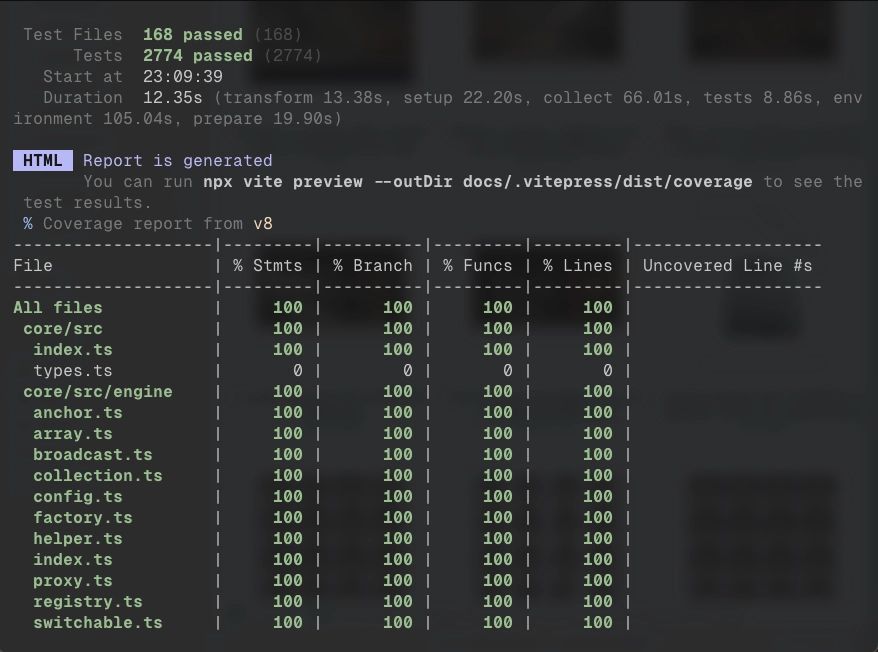
168 test files. 2,774 tests. 100% coverage across statements, branches, functions, and lines. MIT licensed.
Get Started
npx degit beerush-id/airstack/templates/air-react my-app
cd my-app && bun install && bun devnpx degit beerush-id/airstack/templates/air-solid my-app
cd my-app && bun install && bun dev